
Crash guides
Crash record times: match the date and time zone first
Convert record dates and minutes between Indian Standard Time and UTC. Handle midnight correctly and keep round references separate from timestamps.
Priya Mehta · Updated · 4 min read
Put two timestamps on the same clock
Use only a record explicitly marked IST (India, UTC+05:30) or UTC. This changes the time label, not the round result. No account connection is needed.
Enable JavaScript to use the converter, or follow the worked examples below. IST to UTC: subtract 5 hours 30 minutes; UTC to IST: add 5 hours 30 minutes.
The tool neither stores nor sends your entries. Matching timestamps alone cannot prove that two records belong to the same round or that a request was accepted.
Keep the label that tells you what the time means
A record saying 00:15 is incomplete without its date and time zone. It may be a round timestamp, a request time, a later update or the phone clock visible in a screenshot. Preserve the label beside it. This guide does not claim that Master Crash records use any particular zone. The converter only changes a supplied date and minute between Indian Standard Time and UTC; it does not connect to an account, retrieve history or decide whether cash out succeeded.
Use Indian Standard Time explicitly
CSIR–NPL identifies Indian Standard Time as UTC+05:30. For the converter, IST means that Indian offset: five hours and thirty minutes ahead of UTC. Converting IST to UTC subtracts 5:30; converting UTC to IST adds 5:30. Use a 24-hour clock, where 00:15 is fifteen minutes after midnight and 12:15 is fifteen minutes after noon. If a source shows 12:15 AM or PM, resolve that distinction before entering the value. Do not infer a record’s zone merely because you are reading it in India.
Choose the source zone before entering the date
Select whether the original record is in IST or UTC, then enter the date and time shown there. Use the year-month-day format to avoid confusing a day with a month. Press Convert time and read the entire result, including the destination date and zone. Keep the original beside the converted value rather than overwriting it. A result that looks tidy cannot fix an incorrectly selected source zone. If the record has no zone label, ask which zone it uses instead of guessing to make two entries agree.
Crossing midnight changes the calendar date
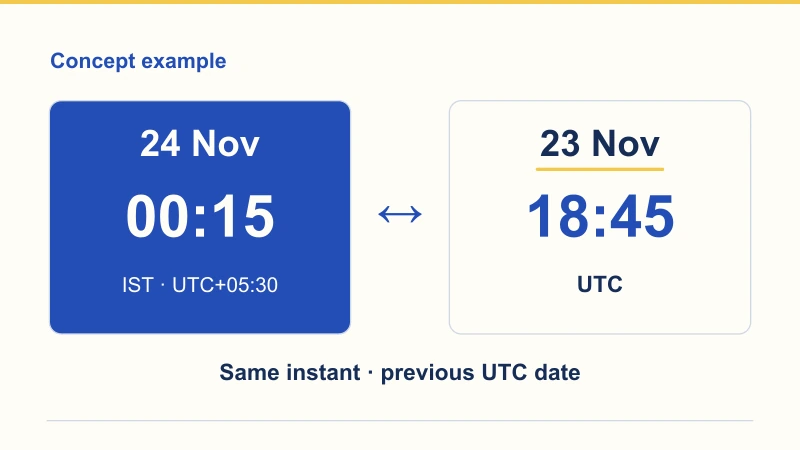
Take 2026-11-24 00:15 IST. Subtracting five hours and thirty minutes gives 2026-11-23 18:45 UTC, on the previous date. In the other direction, 2026-11-24 20:45 UTC becomes 2026-11-25 02:15 IST, on the next date. These are two separate conversion examples, not two records from one round. A date filter using only 24 November could hide the matching entry in another zone. Search the converted date rather than assuming a neighbouring date means an unrelated event.
| Original time | Converted time | Date change |
|---|---|---|
| 2026-11-24 00:15 IST | 2026-11-23 18:45 UTC | Previous date |
| 2026-11-24 20:45 UTC | 2026-11-25 02:15 IST | Next date |
| 2026-11-24 12:00 IST | 2026-11-24 06:30 UTC | Same date |
Equal minutes do not identify the same round
Imagine R301 and R302 both displaying 14:22 after conversion. Minute-level timestamps cannot show their order within that minute, and equal times do not turn two references into one round. The tool accepts dates and minutes; it does not calculate server delay or compare fractions of a second. If the original record includes seconds, retain that full original value separately. The time you took a screenshot is also different from the event time printed inside it. Use the round and request references to establish which action each record describes.
Changing a time zone does not repair a clock
Time-zone conversion applies an offset. It does not establish that the original device clock was accurate or that two systems were synchronized. Google’s Android guidance explains automatic date/time and time-zone settings, with device differences. Inspect the relevant setting if you suspect a display problem, but keep the original record before changing anything. Do not move the phone clock backwards to make an event appear earlier. A five-and-a-half-hour difference between IST and UTC labels can describe the same instant, rather than a processing delay.
Send a short record pair instead of an unexplained screenshot
A useful private support note says: “Original: 2026-11-24 00:15 IST (UTC+05:30). Converted: 2026-11-23 18:45 UTC. Round: R301. Field: request created.” The identifier is fictional, but the structure keeps time, zone and event type together. Add the exact status or error relevant to the question and redact unrelated personal information. The converter’s output supports that explanation; it does not prove a payment, resolve a dispute or replace the product’s authoritative event record.
Questions readers ask
Can the converter discover the time zone in my screenshot?
No. You must identify and select the original zone. An unlabelled time does not provide enough information for a reliable conversion.
Does an earlier converted time prove my cash out arrived first?
No. Conversion changes the representation of a time, not the event or its acceptance. Minute precision cannot establish the ordering of closely spaced actions.
Why does the result show yesterday or tomorrow?
Adding or subtracting 5:30 can cross midnight. Keep the converted date; copying only the clock time would lose the day change.
 Priya Mehta
Responsible use & session planning
Covers session planning, personal boundaries and recognising when to pause. This content does not provide medical or financial advice.