
Android guides
Check your Master Crash APK file without uploading it
Compare a selected APK’s exact size and SHA-256 in your browser. Understand a match, a mismatch and a read error without uploading or installing the file.
Rohan Verma · Updated · 4 min read
Compare your downloaded file
Select the file already on your device. Its contents stay in your browser; this check does not upload, install or scan the app for malware.
The checker needs JavaScript and a browser with HTTPS file-hashing support. You can still compare the reference below with a trusted local checksum tool.
- Selected file size
- SHA-256
Reference file and limits of this check
- File inspected
- 2026-10-13
- Package
com.teenpattimervion.zelvarix- Exact size
- 58,913,222 bytes
- SHA-256
93245d170ac18592ef8193ad241d9412480ca00a6940588c3104c7e7572a716a
A match means the selected file matches this stored reference. It is not an app-safety, publisher, account or gameplay certification. This reference does not identify the separate Google Play package.
Full APK file details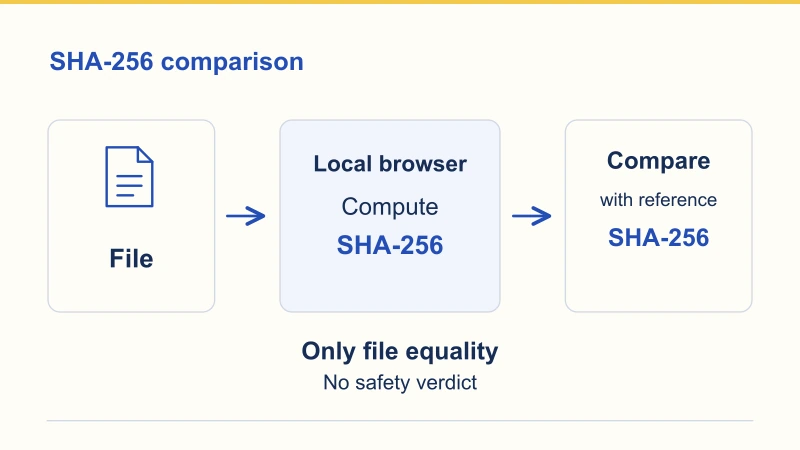
Start with the finished file already on your device
This checker answers one question: does the file you select match the APK reference published on this website? It reads that selected file in your browser; it does not upload the file, start another download or install an app. First let the browser finish downloading, then locate the completed file in Downloads. A shortcut, a web link or a temporary download entry is not the completed APK.
Know which reference the result belongs to
The reference contains exactly 58,913,222 bytes and the SHA-256 displayed in the tool’s reference details. The familiar 58.9 MB label is rounded; use the byte count for an exact size comparison. This is one documented file, not a register of every Master Crash version. A later release, a different package or a repackaged copy may have different bytes. The result belongs to the displayed reference, not the folder’s brand name.
Choose, then check: two deliberate steps
Use the file selector to choose the completed APK, and read the selected filename before pressing Check file. The tool compares the exact size first. If it differs, the result is Different without reading the contents or computing a hash. Only a same-size file proceeds to SHA-256 comparison. Leave the page open until a result or error appears. If you selected the wrong file, clear the selection and choose again instead of trying to rename unrelated data into an APK.
Read a match as an identity comparison
A matching byte count and full SHA-256 are strong evidence that the selected file has the same contents as the published reference. Size alone is insufficient: two different files can occupy the same number of bytes. Compare the whole digest, not just a few characters at either end. Renaming a file, including the browser adding “(1)” to its name, does not alter its contents or its hash. A match still does not certify the file as safe, establish its publisher or guarantee successful installation.
A mismatch and an unreadable file need different responses
A mismatch means the selected file does not satisfy the reference comparison. Confirm that it is the intended completed download and that the reference belongs to that release. Do not label every mismatch malware: a different legitimate version can also differ. Check not completed means no full comparison was obtained; it is neither a match nor a mismatch. Keep the exact error wording, make sure the file is available locally and select it again. Clear resets the page’s selection and result; it does not delete your saved file.
| Result | Meaning | Next step |
|---|---|---|
| Matched | Exact size and full SHA-256 match this reference. | Keep the result; assess installation warnings separately. |
| Different | Size or computed SHA-256 differs from this reference. | Confirm the completed file and intended reference. |
| Check not completed | No full result: unreadable file, unavailable capability or timeout. | Read the message, Clear and retry in an HTTPS browser. |
Use HTTPS and allow the browser to finish
Open the HTTPS version of the website in a current browser. The browser hashing capability requires a secure context; an unsupported browser or an unreadable file can prevent a result. MDN also documents that this hashing method reads the input into memory. If an attempt has not finished after 30 seconds, the tool stops waiting and reports Check not completed. Clear, close unnecessary tabs and retry with the completed file. This timeout is not a promise of completion within 30 seconds.
Keep Google Play installations outside this check
Android documents that Google Play can generate device-specific APKs from an App Bundle, including a base APK and configuration components. This single-file checker does not validate that installed set. Selecting one extracted component, an APK collection or the Play app’s icon is not a check of the whole installation. Use the tool for the documented standalone download only. If you need help, share the result label, observed byte count and reference you used through the appropriate private channel; a password or account login is never needed for a file comparison.
Questions readers ask
Will selecting a file upload it or install it?
No. The comparison runs locally in your browser. It does not send the file to the server, initiate an APK download or open an installer.
Can a renamed APK still match?
Yes. The digest is computed from file contents, not its filename. A name change alone does not alter the SHA-256; editing the contents is a different operation.
Why does the correct-looking size not prove a match?
A rounded label can hide a byte difference, and even identical exact sizes can contain different data. The checker also compares the complete SHA-256 with the stated reference.
 Rohan Verma
Android downloads & troubleshooting
Covers APK file details, Android installation, version checks and practical update troubleshooting.